Picsart vs Canva Which Design Tool Wins for E-commerce

The core difference between Picsart and Canva for e-commerce really boils down to this: Canva is for building a consistent brand, while Picsart is for creating dynamic, attention-grabbing visuals.
The goal is to scale without dubious shortcuts and without hurting your credibility.
If your main goal is to streamline marketing asset creation using brand kits and make team collaboration seamless, Canva is the obvious choice. But if you need powerful, artistic photo editing and trendy, mobile-first social content, Picsart is where you'll want to be.
Which Design Tool Wins for E-commerce
Picking between Picsart and Canva is a major decision that will shape your brand’s visual identity and your day-to-day marketing workflow. Both are giants in the design software world, but they cater to very different needs within an e-commerce business.
The photo and video editing market is a massive $20 billion industry, and Adobe, Canva, and Picsart dominate a staggering 60% of it. This just goes to show how essential they are. But for a store owner, the "best" tool depends entirely on what you're trying to accomplish. You can dig into the full stats on Canva's impressive growth to see just how big it's become.
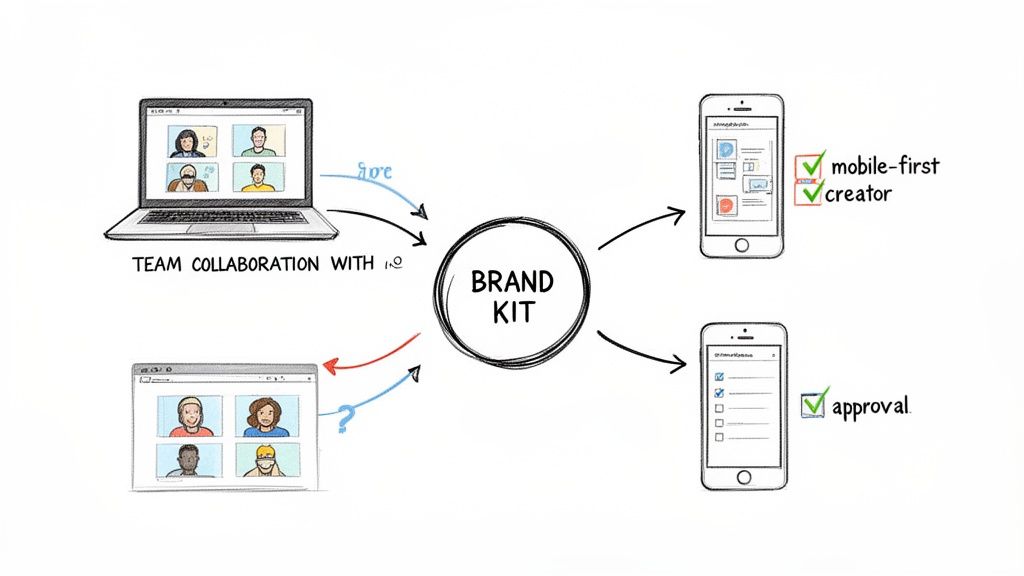
This visual really gets to the heart of how each platform serves e-commerce users.
As you can see, Canva is positioned as the go-to for brand management, while Picsart shines as the specialist for detailed, creative photo editing.
Quick Verdict Picsart vs Canva for E-commerce
To help you decide faster, I've put together a table breaking down which platform is better suited for the most common e-commerce tasks. Think of this as the high-level summary before we get into the nitty-gritty feature comparisons.
| E-commerce Task | Best Choice | Why |
|---|---|---|
| Building a Brand Kit | Canva | Canva's Brand Kit feature is built for this. It centralizes your logos, brand colors, and fonts, ensuring every asset your team creates is perfectly on-brand. |
| Advanced Product Photo Editing | Picsart | Picsart simply has a more powerful toolkit. You get more artistic filters, advanced layering tools, and fine-tuned manual adjustments for total control over your product shots. |
| Designing Social Media Ads | Canva | Speed and polish matter here. Canva’s massive library of professional, business-focused ad templates makes it incredibly fast to produce high-quality campaigns for any platform. |
| Creating Viral Social Content | Picsart | For content that feels native to TikTok or Instagram Reels, Picsart is the winner. Its trendy effects, AI stickers, and user-generated templates are made for creating viral moments. |
| Team Collaboration | Canva | Canva was designed for teams from the ground up. Real-time collaboration, commenting, and organized folders make it the perfect fit for marketing departments and agencies. |
This quick breakdown shows that the right tool truly depends on the job at hand. Neither is a one-size-fits-all solution; they're specialists that excel in different areas of your e-commerce marketing strategy.
A Look at Core Editing and AI Capabilities
When you pit Picsart against Canva, you're really looking at two different philosophies on creative control. Both platforms are powerhouses, but they come at design from opposite ends. This difference is what will ultimately determine which one fits your e-commerce workflow best.
To put it simply, Canva is all about structured, brand-focused efficiency. Picsart, on the other hand, is a playground for artistic freedom and detailed, layer-based editing.
This matters in a crowded market. The photo and video software industry is a $20 billion behemoth, with Adobe, Canva, and Picsart commanding a whopping 60% of it. Canva’s edge comes from its massive user base and business-first mindset. Meanwhile, Picsart keeps pushing the envelope with AI features for the booming $2.37 billion photo editing space, where "prosumers" are on track to make up nearly 45% of the market by 2025. For a deeper dive, check out the data on the photo editing software market.
Photo Editing: A Tale of Two Philosophies
Canva’s photo editing tools are built for one thing: speed. They’re seamlessly integrated into the design process, letting you crop an image, slap on a filter, tweak the brightness, and drop it into a template in seconds. For day-to-day e-commerce tasks—like getting a clean product cutout for your Shopify store—tools like Magic Edit and the one-click Background Remover are incredibly fast and effective.
Picsart feels much more like a mobile-first cousin to Adobe Photoshop. Its real power is in the layer-based editing system, which gives you painstaking control over every single detail. You can get into advanced masking, play with different blending modes, and experiment with a huge library of artistic effects that go way beyond simple color correction.
The Bottom Line: Canva’s editing tools are a means to an end—they prep images for a larger design. For Picsart, the editing tools are the main attraction, offering a deep, creative suite to build an image from scratch.
What does this mean for a store owner?
- For clean, consistent product shots for your website: Canva is your workhorse. It's faster and more direct.
- For unique, stylized lifestyle photos for social media: Picsart gives you the creative muscle you need.
AI Features: Practicality vs. Possibility
Both platforms have gone all-in on AI, but they’re solving different problems. Canva’s Magic Studio is a suite of tools designed to make brand-aligned content creation faster. You get things like Magic Write to draft copy and Magic Design to instantly generate presentations or ads from a prompt. The goal here is producing on-brand content at scale.
A media buyer, for instance, could use Magic Design to spit out ten different ad concepts for a new product in minutes, all perfectly matched to the brand's font and color palette. The AI acts as a productivity engine, taking the repetitive work off your plate.
Picsart's AI, however, is built for creative exploration. Its text-to-image generator is fantastic for whipping up unique backgrounds, abstract patterns, or wild elements to blend into your photos. The AI Replace tool is perfect for swapping out objects in an image with surprising precision, while the AI Enhance feature can rescue low-resolution product shots and make them sharp.
A Head-to-Head Look at AI Use Cases
| E-commerce Task | How You'd Do It in Canva | How You'd Do It in Picsart |
|---|---|---|
| New Ad Campaign | Use Magic Design to auto-generate a full set of ad templates using a product photo and brand colors. | Use the AI Image Generator to create a totally unique background, then manually composite the product photo onto it. |
| Product Mockups | Drop your product image into one of Canva’s thousands of pre-made mockup templates (t-shirts, mugs, etc.). | Use AI Replace to realistically insert your product into a stock lifestyle photo, building a custom scene from the ground up. |
| Blog Post Visuals | Generate a simple, on-brand graphic with the AI image generator to illustrate your topic quickly. | Create a highly detailed, artistic hero image that sets a specific mood and grabs the reader's attention. |
The Verdict on Editing and AI
At the end of the day, your choice comes down to your goal. Canva's AI and editing suite is built for the marketer who needs to crank out a high volume of professional, brand-consistent assets without wasting time. It’s all about efficiency and creating a system.
Picsart is for the creator who wants to break the mold. Its advanced editing and generative AI give you a sandbox to build visuals that stop the scroll and feel truly one-of-a-kind. If your brand leans more artistic or trend-driven, Picsart offers a depth of control that Canva just can't touch.
Analyzing Template and Asset Libraries
For any e-commerce brand, a deep library of templates and assets is the engine room for content creation. It’s here that the core philosophies of Picsart and Canva really diverge, and your choice will shape how you produce everything from brand-aligned ads to trend-chasing social posts.
The fundamental difference is one of structure versus spontaneity. Canva gives you a polished, professional framework built for brand consistency. Picsart, on the other hand, is a more freewheeling, creatively fertile ground perfect for jumping on viral trends.
Canva Templates: A Blueprint for Branding
Canva's template library is less of a collection and more of a meticulously organized business arsenal. With over 250,000 free templates and another 610,000+ premium options, it’s built from the ground up for specific marketing tasks. You’ll find everything from slick Shopify banners and email newsletter headers to detailed product catalogs and ad creatives sized perfectly for every major platform.
But the real magic is how these templates work with the Brand Kit. You can apply your brand’s exact colors, fonts, and logos to almost any template with a single click. This feature alone is a massive time-saver, turning a generic starting point into a custom, on-brand asset in seconds.
For an e-commerce brand that needs to pump out a high volume of consistent assets—like weekly promotional emails or a steady stream of Facebook ads—Canva’s template system is just built better. It’s designed for scale and brand integrity.
Let's say you need to launch a flash sale. In Canva, the workflow is incredibly efficient:
- Search for "flash sale email header."
- Pick a professional-looking design that catches your eye.
- Click your Brand Kit to instantly apply your company’s visual identity.
- Export the finished graphic in minutes.
This whole process is engineered for speed and consistency, making it the go-to for structured campaigns where a cohesive brand image is non-negotiable.
Picsart Templates: Tapping into the Zeitgeist
Picsart plays a completely different game. Its template library feels less like a corporate stockroom and more like a live feed of what’s blowing up on social media right now. The templates are heavily community-generated, mirroring the aesthetics, memes, and video formats that are currently popular on platforms like TikTok and Instagram Reels.
You won't find a huge selection of polished, corporate-style email banners here. What you will find are templates for edgy photo collages, popular meme formats, and video styles that feel completely native to social feeds. This makes Picsart the ideal tool for creating reactive content that grabs the attention of a younger, more online audience.
For example, a clothing brand wanting to hop on a trending TikTok sound will find video templates in Picsart that perfectly match that trend's visual vibe. The goal isn't strict brand consistency; it's cultural relevance and the potential for a post to go viral.
Stock Assets and Commercial Licensing
Beyond templates, both tools offer massive libraries of stock photos, videos, graphics, and audio. Canva’s library is curated for professional and commercial use, packed with high-quality assets that slot perfectly into business marketing. The licensing is straightforward for promotional use, making it a safe bet for ads and website content.
Picsart’s asset library is far more eclectic. It mixes professional stock content with a sprawling collection of user-generated stickers, GIFs, and graphics. While this is a goldmine for creating truly unique social posts, navigating the commercial usage rights requires a bit more diligence. You’ll need to pay closer attention to the source and licensing terms, especially if you plan to use a community-created element in a paid ad campaign.
Ultimately, your choice here boils down to your primary goal. If you need a reliable system for producing a large volume of on-brand marketing materials, Canva is the undisputed champ. But if your strategy is all about creating original, trend-driven content for social media, Picsart’s dynamic, community-fueled library provides the creative firepower you need.
Workflow and Team Collaboration: How Do They Actually Work?
A design tool is only as good as how well it fits into your day-to-day grind. This is where the Picsart vs Canva debate really heats up, moving past feature lists and into their core philosophies. Your best choice hinges on a simple question: are you a team player or a solo act?
Canva was clearly built with teams in mind. Its whole environment is geared toward making sure everyone stays on the same page and keeps the brand looking consistent. On the flip side, Picsart is a champion for the individual creator, with a workflow built for speed, creative experimentation, and getting things done on the go.
Canva: The Collaboration Powerhouse
Canva’s magic is its structured, multi-user environment. If your e-commerce brand has a marketing team, a social media manager, and maybe a freelance designer all working together, its collaborative features are non-negotiable.
The platform is designed to smooth over all the usual bumps in a team-based workflow. Think real-time co-editing, in-design comments, and clear approval flows. This means no more of that painful back-and-forth of downloading files, emailing them for feedback, and re-uploading the new version. It all happens in one place.
The heart of this entire system is the Brand Kit. This is your central command for brand assets—logos, color palettes, and fonts are all stored here. It ensures every single thing your team creates, from a social post by an intern to an ad creative by a seasoned designer, is perfectly on-brand. For any e-commerce business trying to maintain a cohesive look across a Shopify store and social channels, this feature is a lifesaver.
Canva isn’t just a design tool; it’s a content production system. Its team-centric infrastructure is designed to scale with your business, providing the brand governance and efficiency you need to grow.
This team-first approach is a huge reason for its explosive growth. Projections show Canva reaching 220 million monthly active users by 2025, and it’s already used by 90% of Fortune 500 companies. That kind of adoption speaks volumes about its effectiveness in a professional setting, a market where Picsart simply plays a different game. You can dig deeper into design platform marketing statistics on amraandelma.com.
Picsart: The Solo Creator's Sandbox
Picsart’s workflow is all about agility and personal expression. It’s the perfect tool for a solo founder, a dropshipper, or a content creator who needs to churn out eye-catching visuals fast, often straight from their phone. The whole experience feels less like following rigid brand rules and more like a creative playground.
Its mobile-first design is its superpower. You can snap a product photo, throw on some trendy effects, and have it live on Instagram in just a few minutes, all from one device. The process is spontaneous and reactive, making it ideal for jumping on social media trends the moment they pop.
Collaboration on Picsart is less about formal teamwork and more about community inspiration. Users can share "replays" of their editing process or "remix" each other's designs. It’s a fantastic way to get new ideas and see what others are doing, but it just doesn't have the structured tools a marketing team needs for their daily operations.
Key Workflow Integrations
How well a tool connects with your other platforms can make or break its usefulness. Here again, Canva’s business-first focus gives it an edge with more professional integrations.
- Canva: Boasts a direct and powerful integration with Shopify, letting store owners design and publish visuals without ever leaving their e-commerce dashboard. It also plays nicely with social media schedulers like Buffer and Hootsuite, and connects to cloud storage like Google Drive and Dropbox.
- Picsart: Its strength is direct sharing to social platforms like TikTok, Instagram, and Snapchat. While you can save your creations and upload them to Shopify, it lacks the deep, app-level integrations that make a professional marketing workflow truly seamless.
So, who wins on workflow? It comes down to your team. If your e-commerce brand is built on teamwork, approvals, and strict brand consistency, Canva is the undisputed champion. But if you're a nimble solo creator focused on unique, trend-driven social content, Picsart's agile, mobile-first approach is second to none.
Breaking Down Pricing and Commercial Licensing
Let's get real about the cost. The sticker price of a design tool is just the beginning. For any e-commerce brand, the true cost is wrapped up in what you get for your money and, maybe more importantly, what you’re legally allowed to do with the assets you create.
Both Picsart and Canva have pretty generous free plans to get you started. But the moment you need to get serious, you’ll hit a paywall. The most valuable e-commerce tools—think one-click background removers, premium stock photos, and slick AI generators—are almost always locked away in the pro versions. This is where you have to weigh the investment.
A Head-to-Head Pricing Comparison
At a glance, both platforms look similar: a free plan for basic tasks and pro tiers built for businesses. Canva Pro has built its reputation on being an all-in-one suite, packing a ton of value into a single subscription. Picsart Pro, on the other hand, comes in at a competitive price point, with a strong focus on unlocking its more powerful photo editing and AI tools.
So, where do you draw the line? I've put together a table to show you exactly which e-commerce features you get at each level.
Picsart vs Canva Pricing Plans Feature Breakdown
For any online store, certain features are non-negotiable. This table breaks down what's included in the free versus paid plans for both platforms, so you can see where your money goes.
| Feature | Picsart (Free) | Picsart Pro | Canva (Free) | Canva Pro |
|---|---|---|---|---|
| Background Remover | Limited Use | Unlimited | ❌ No | Unlimited |
| Premium Stock Photos | ❌ No | Yes | Limited Selection | Yes |
| AI Image Generator | Limited Credits | More Credits | Limited Credits | More Credits |
| Brand Kit | ❌ No | ❌ No | ❌ No | Yes |
| Content Scheduler | ❌ No | ❌ No | ❌ No | Yes |
| File Formats | Basic (JPG, PNG) | Adds PDF, etc. | Basic (JPG, PNG) | Adds SVG, etc. |
| Commercial License | Limited | Yes | Limited | Yes |
As you can see, a paid subscription is practically a requirement for a running e-commerce business. Without it, you're missing out on the very tools that make these platforms a game-changer for creating professional-grade content quickly.
Navigating Commercial Licensing Rules
This is the part that trips up so many new store owners. There’s a huge difference between using a stock photo in a social media ad and printing it on a t-shirt to sell. You absolutely have to understand the licensing agreements for both Picsart and Canva to stay out of trouble.
Crucial Takeaway: Using Pro assets for marketing materials (like a Facebook ad or website banner) is typically fine. But using those same assets on merchandise you plan to sell—like a phone case or a poster—is a whole different ballgame with strict rules.
You can't just grab a cool illustration from Canva's library, slap it on a mug, and start selling it. That's a direct violation of their terms. The asset has to be part of a larger, original design you created. You need to substantially change it by adding text, combining it with other graphics, or applying effects to make it your own.
- Canva: The Canva Content License Agreement is very clear: you cannot use their Pro content on a standalone basis for print-on-demand products. Your design must be an original composition.
- Picsart: It's a similar story. Their commercial license allows you to use assets in designs for sale, but the stock element can't be the main reason someone is buying the product. It has to be just one piece of a bigger creative puzzle.
Ignoring these rules can land you in serious legal hot water. Always read the fine print. When in doubt, make sure the stock elements are just ingredients in your design, not the entire meal. In the Picsart vs Canva debate, choosing the right tool is one thing; using it legally is everything.
The Final Verdict: Picsart vs. Canva for Your E-commerce Store
When it comes to Picsart vs. Canva, there’s no universal "best choice" that fits every e-commerce brand. The right tool for you really boils down to your specific business model, your team's setup, and your overall content strategy. It's less about which platform has the longest feature list and more about which one fits your creative workflow like a glove.
Think about it this way: are you trying to build a scalable, consistent brand powerhouse, or are you focused on creating a viral content machine? Your answer to that question will point you straight to the right platform.
Choose Canva for Brand Consistency and Scale
For e-commerce businesses that live and breathe brand consistency, Canva is the undisputed champion. It’s built from the ground up for teams that need to pump out a high volume of marketing assets—from social media ads to email banners—all while staying perfectly on-brand.
Canva truly shines with features designed for operational efficiency:
- Brand Kits: This is the cornerstone of brand consistency. You can centralize your logos, color palettes, and fonts, ensuring every single design looks like it came from the same C-suite, no matter who on your team created it.
- Team Collaboration: With real-time editing, commenting, and approval workflows, you can say goodbye to endless email chains and version control nightmares.
- Professional Templates: Its massive library of business-centric templates means you're never starting from scratch. You can create polished marketing materials in minutes, not hours.
If your mantra is "consistency is key," and you need a system that can grow with your team, Canva is your command center. It turns your brand guidelines into an efficient, repeatable content engine.
Choose Picsart for Creative Freedom and Social Trends
Picsart is the perfect playground for brands that thrive on eye-popping, artistic visuals. If your goal is to stop the scroll on trend-heavy platforms like TikTok and Instagram, Picsart gives you the creative firepower you need. It’s an ideal fit for solo entrepreneurs, content creators, and small teams focused on making one-of-a-kind product photos and viral-ready content.
Its creative edge comes from:
- Advanced Photo Editing: You get far more granular control with tools like layers, masking, and a huge array of artistic effects. This lets you create product images that are truly unique.
- Trend-Focused Content: Picsart’s library of templates, stickers, and effects feels like a direct feed from what’s hot on social media right now.
- Mobile-First Workflow: The platform is a dream for on-the-go editing, making it perfect for capturing a moment and turning it into a social post within minutes.
If you’re a Shopify store owner who shoots your own products and manages a dynamic Instagram feed, Picsart is the creative sandbox you’ve been looking for. It gives you the power to create visuals that don’t just sell a product—they tell a compelling, artistic story. Your choice in the Picsart vs. Canva debate should be a direct reflection of your brand's personality.
Frequently Asked Questions
Getting into the weeds of design tools can bring up a lot of questions. Here are some of the most common ones that e-commerce owners ask when weighing Picsart against Canva, with direct answers to help you choose with confidence.
Can I Use Picsart or Canva Images on Products I Sell?
This is a huge deal for anyone in e-commerce. It's one thing to use designs for marketing materials like ads or social media posts—that's generally fine on the paid plans. But using stock assets directly on products for sale, like t-shirts or mugs, is a whole different ballgame.
Both the Canva Pro Content License and Picsart's commercial license permit this, but they share a massive catch: you can't use their assets on a standalone basis. This means you must modify the assets significantly to create a genuinely original design.
For print-on-demand sellers, this is non-negotiable. You have to combine stock assets with your own text, other graphics, and unique effects. Never just slap a single library graphic on a product and call it a day.
Which Tool Is Better for Removing Photo Backgrounds?
On their paid plans, both platforms offer fantastic one-click background removal tools. Honestly, for most standard e-commerce product shots, the results are almost identical and more than good enough. The real difference comes down to your workflow.
- Canva's Background Remover is built for speed and marketing. You can pull the background from a product shot and drop it straight into an ad template without missing a beat. It's incredibly fluid.
- Picsart's Remove BG tool feels more at home within a powerful photo editor. If the AI's first pass isn't quite right, you get more robust tools for manual refinement and masking to get the cut perfect.
If you just need to get a product into a template fast, Canva has a slight edge. If you're dealing with tricky images or want to do more creative photo editing afterward, Picsart gives you that extra layer of control.
Which Platform Integrates Better with Shopify?
Canva wins this one, hands down. It has a deep, native integration through the Canva for Shopify app, which is a game-changer. You can design banners, update product pages, and create other store visuals right from your Shopify dashboard. It’s about as seamless as it gets.
Picsart doesn't offer a dedicated app integration on that level. You can, of course, create your designs in Picsart and upload them to your Shopify store manually. But if your entire business lives on Shopify and you want the most efficient process possible, Canva’s direct link is a massive plus.
Stop overpaying for dozens of separate e-commerce tools. EcomEfficiency bundles over 50 premium AI, SEO, and ad-spy platforms—including Canva, Midjourney, and ChatGPT—into one simple, affordable subscription. Cut your software costs by up to 99% and unlock the tools you need to grow at https://ecomefficiency.com.