How to Optimize Amazon Listings for Maximum Sales

Optimizing an Amazon listing isn't about just one thing; it’s a strategic workflow where every piece has to fit together perfectly to satisfy both shoppers and Amazon’s A9 algorithm. It all starts with deep keyword research, which fuels compelling titles and benefit-driven bullet points. From there, you bring your product to life with high-quality visuals and A+ Content, and finally, you tie it all together by optimizing your backend search terms.
The goal is to scale without dubious shortcuts and without hurting your credibility.
Think of it as a domino effect—each optimized element pushes the next one forward, collectively boosting your visibility and, more importantly, your conversion rates.
Your Blueprint for a High-Ranking Amazon Listing
Before we get into the nitty-gritty, let's zoom out and look at the big picture. A winning listing isn't just a random assortment of keywords and pictures; it's an interconnected system. The goal is to create a smooth journey for the customer, from the moment they see you in the search results to the second they click "Add to Cart," all while feeding Amazon's algorithm the positive signals it craves.
To get a solid grasp of the fundamentals, this a complete guide to Amazon Listing Optimization is a great place to start. It really drives home how each part of your listing has a specific job to do.
- Keywords: These are the essential bridge connecting your product to what real customers are searching for.
- Copywriting: This is your 24/7 digital salesperson, translating dry features into tangible benefits that solve a problem for your customer.
- Visuals: Your images, videos, and A+ Content act as your virtual storefront. They build trust, answer questions, and show your product's true value.
- Backend: This is your behind-the-scenes communication line directly with the A9 algorithm, giving it all the data it needs to index and rank your product correctly.
This workflow breaks down how these stages flow logically from one to the next.
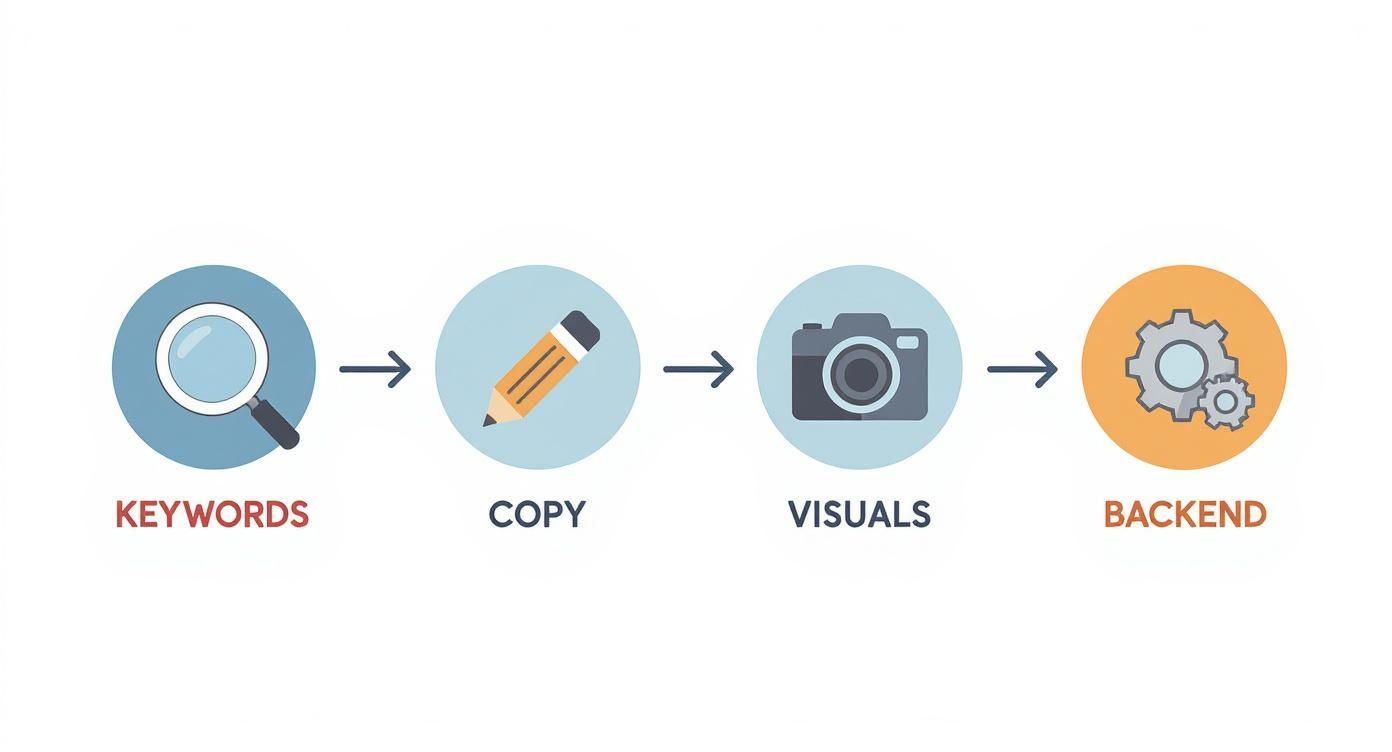
As you can see, it's a clear progression. You start with the foundation—the keywords—and build everything else on top of that, right through to the final backend details. In the sections that follow, we're going to break down exactly how to master each of these steps.
For a quick reference, here’s a breakdown of the core components of a fully optimized listing and what you’re trying to achieve with each one.
Core Components of a Fully Optimized Amazon Listing
This table summarizes the key elements of your listing and the primary optimization goals for each, helping you focus your efforts where they matter most for visibility and sales.
| Listing Element | Primary Goal | Key Optimization Tactic |
|---|---|---|
| Product Title | Maximize search visibility and click-through rate (CTR) | Front-load main keywords; include brand, quantity, and key features. |
| Bullet Points | Convert shoppers by highlighting benefits and features | Write benefit-driven copy that solves customer problems. |
| Product Description | Tell a deeper brand story and overcome objections | Use storytelling and address frequently asked questions. |
| Main Images | Capture attention and build initial trust | High-resolution, professional photos showing the product in use. |
| A+ Content | Increase conversion rate and reduce returns | Use compelling brand stories, comparison charts, and rich media. |
| Backend Keywords | Improve indexing for a wider range of search terms | Fill with relevant long-tail keywords, synonyms, and translations. |
Ultimately, the goal is to create a cohesive and persuasive experience for the shopper. Each element should support the others, reinforcing the value of your product at every turn.
A huge mistake I see sellers make is working on these pieces in isolation. A killer title won't save a listing that has blurry, uninspired images. And the best photos in the world can't make up for a listing that's targeting the wrong keywords. Success comes when all these elements are in sync, working together.
Finding the Words Your Customers Actually Search For
Everything on Amazon starts with the search bar. Before you touch your title, write a single bullet point, or choose an image, you have to get inside your customer's head. What words are they typing in when they're looking for a product like yours? Get this wrong, and nothing else you do matters.
This isn't about guessing. It's a deliberate process of digging into data and understanding the language of your market. Our goal here is to build a master list of keywords that will guide every optimization choice we make from here on out.
Brainstorming Your Core Terms
First, let's get the obvious stuff down. Think like a customer. If you sell a "silicone baking mat," that's your starting point. This is what we call a seed keyword.
Now, let's branch out from there. What are other ways to describe it? What do people use it for?
- Synonyms: Think "baking sheet liner" or "non-stick pastry mat."
- Problems it solves: How about "oven liner for cookies" or "reusable parchment paper."
- Specific features: Maybe "baking mat for toaster oven" or "professional grade baking mat."
This gives you a solid seed list. But these are still just educated guesses. To know what's real, we need data. This is where tools like Helium 10 or Jungle Scout become essential. They pull actual search volume from Amazon, turning your brainstorm into a data-backed strategy.
Let Your Competitors Do the Hard Work
Here's one of my favorite shortcuts: reverse-engineer your competition. Find the top three to five sellers who are always on the first page for your main keywords. They're successful for a reason—Amazon's algorithm already loves them for a whole host of search terms.
You can use a "reverse ASIN" tool (most major Amazon seller suites have one) to plug in their product ASIN and see the exact keywords they're ranking for. This is an absolute goldmine. You'll instantly uncover phrases you never would have thought of, like "macaron baking mat" or "reusable parchment paper alternative," that are already proven to drive sales.
Pro Tip: Pay close attention to keywords where several of your top competitors are all ranking in the top 10. That's a massive signal from Amazon that the term is not just relevant, but also converts shoppers into buyers.
Understanding What They Mean When They Search
It’s crucial to remember that not all keywords have the same value. Someone searching for "baking mat" is probably just starting their research. But a person searching for a "half sheet silicone baking mat non-toxic BPA-free" is holding their credit card and is ready to buy.
Your keyword strategy needs to account for this difference in intent. You need a mix of broad terms to cast a wide net and hyper-specific phrases to catch those ready-to-buy shoppers.
| Keyword Type | What's the Intent? | Example | Where to Use It |
|---|---|---|---|
| Short-Tail | Browsing, general interest. High search volume. | "baking mat" | These are your heavy hitters. Perfect for your title. |
| Mid-Tail | Narrowing down options, comparing. | "silicone baking mat set" | Great for capturing consideration. Use these in your bullet points. |
| Long-Tail | Ready to buy, very specific. Low volume, high conversion. | "professional grade non-stick oven liner" | These convert. Perfect for backend keywords and A+ Content text. |
As you build your master list, filter everything through three lenses: relevance, search volume, and competition. Relevance is king—if it doesn't perfectly match your product, ditch it. Then, find that sweet spot of decent search volume without being impossible to rank for. This strategic approach is how you get seen and get sales.
Writing Copy That Converts Clicks Into Sales
Okay, you’ve done the hard work and have a solid keyword map. Now it’s time to turn that research into revenue. Writing great copy for your Amazon listing isn't about being a creative wordsmith; it's about strategic persuasion. Every single word has a job to do—it needs to feed the A9 algorithm while also convincing a real person to hit "Add to Cart."

The key is getting your title, bullet points, and description to work together seamlessly. Each piece plays a specific role in guiding a shopper from just browsing to actually buying.
Crafting a High-Impact Product Title
Let's be clear: your product title is the most important piece of real estate on your entire listing. It's what people see in the search results and what carries the most weight for keyword ranking with Amazon's algorithm. The trick is to stuff it with keywords without making it sound like a robot wrote it.
There's a formula that I’ve seen work time and time again across almost every category:
Brand Name + Main Keyword/Product Type + 2-3 Key Features/Benefits + Size/Color/Quantity
Let’s say you’re selling a bamboo cutting board.
- Weak Title: Cutting Board for Kitchen
- Strong Title: Royal Bamboo Extra Large Bamboo Cutting Board with Juice Groove - Professional Grade Butcher Block for Chopping Meat & Vegetables (18x12 Inch)
See the difference? The second title is a powerhouse. It tells the shopper everything they need to know right away. You've got the brand, the core product, the game-changing benefits ("juice groove," "professional grade"), and the exact dimensions. This one title can capture people searching for broad terms and those looking for something very specific.
Transforming Bullet Points into a Sales Pitch
Nobody reads on Amazon. They scan. Your bullet points are your chance to grab their attention and make a quick, compelling case for your product. The biggest mistake people make is just listing features. You have to translate those features into tangible benefits.
For every bullet point, ask yourself, "So what? Why should a customer care?" Lead with the benefit, then back it up with the feature that makes it possible.
Back to our cutting board:
- Feature-Focused (Weak): Made of 100% bamboo.
- Benefit-Driven (Strong): MESS-FREE PREP: Features a deep, built-in juice groove to catch excess liquids from meats, fruits, and vegetables, keeping your countertops clean.
This approach immediately connects a product detail to a problem the customer wants to solve. You're not just selling a piece of wood; you're selling a cleaner kitchen. That’s what makes people buy.
Always remember, shoppers are inherently selfish. They don't care about your product's specs until they understand how those specs make their life better. Frame everything around their needs and desires.
Structuring Your Product Description for Trust
While the title and bullets do most of the selling, the product description is your closing argument. This is where you can build trust, handle objections, and really tell your brand's story.
Anyone who scrolls this far down the page is seriously considering a purchase but is probably looking for a reason not to buy. Your job is to leave them with none.
- Tell a story. Briefly share who your brand is or what problem you set out to solve. It creates a human connection in a faceless marketplace.
- Detail the specs. Now's the time for the nitty-gritty: precise measurements, material details, care instructions, and exactly what’s in the box.
- Tackle objections head-on. What might make someone hesitate? Is it hard to clean? Will it dull their expensive knives? Address those concerns directly and honestly.
Specific, quantitative information is your best friend here. Numbers for weight, size, and lifespan provide tangible proof and build confidence. Just keep it concise and relevant—you only have a 2,000-character limit to work with. Remember to make your bullet points scannable fragments, not dense sentences, so customers can absorb the key details in a flash. For a deeper dive into Amazon's official guidelines, the team at Jungle Scout put together a comprehensive article that's well worth a read.
By weaving your keywords into a story that addresses customer needs, your copy will satisfy both the search algorithm and the shopper's psychology. That’s how you turn browsers into buyers.
Using Visuals and A+ Content to Win Shoppers Over
Let's be blunt: your keywords get you found, but your images get you paid.
On Amazon, shoppers can't touch, feel, or test your product. Your visuals have to do all the heavy lifting. Think of your listing as a digital storefront. A blurry, poorly lit photo is the equivalent of a dusty, uninviting shop window. It kills trust instantly.
It all starts with that critical main image. Amazon has strict, non-negotiable rules for a reason. Your primary "hero" shot must be on a pure white background (RGB 255, 255, 255) and measure at least 1000 pixels on its longest side. This isn't a suggestion—it's what enables the zoom feature and creates the clean, uniform look that Amazon shoppers expect. A professional main image is the single biggest factor in earning that first click from the search results page.
The real persuasion, though, happens in the rest of your image slots. This is where you stop just showing the product and start selling it by telling a compelling visual story.
A Strategic Framework for Your Images
Don't just upload a random collection of photos. Every single one of your five to seven image slots needs a job to do. You're guiding the customer on a journey, answering their questions before they even think to ask them.
A battle-tested image strategy usually includes a mix of these:
- Lifestyle Shots: Show your product being used in a real-world setting. Selling a yoga mat? Show someone using it in a bright, beautiful studio, looking happy and relaxed. This helps shoppers mentally place the product in their own lives.
- Infographics: Use clean text overlays and icons to call out the most important features. An infographic can instantly communicate the dimensions of a backpack or highlight that a water bottle is BPA-free. It makes key benefits impossible to miss.
- Comparison Charts: Pit your product against the competition or an older version. A simple side-by-side chart showing why yours is lighter, more durable, or has a unique feature can be an incredibly powerful conversion tool.
- Scale and Detail Shots: Show the product next to a common object (like a phone or a coffee mug) to give an immediate sense of its size. Get up close with macro shots to highlight quality stitching, material texture, or unique craftsmanship. This builds confidence.
When you use your image slots this strategically, you anticipate and answer customer questions, reducing their hesitation and ultimately cutting down on returns.
Elevating Your Brand with A+ Content
For anyone enrolled in Amazon Brand Registry, A+ Content is a game-changer. It lets you swap out that boring plain-text product description for a rich, visually-driven brand experience. This is your best opportunity to look like a premium brand and leave generic competitors in the dust.
A+ Content is where you can truly tell your product’s story and showcase your unique value with some real flair.
Pro Tip: One of the most powerful A+ modules is the comparison chart. Use it to cross-sell other products in your catalog. By featuring three or four related items with their key features side-by-side, you encourage shoppers to stay within your brand's ecosystem. It's a simple way to increase the average order value.
The best A+ Content uses a variety of modules to break up text and guide the shopper's eye down the page. Forget long paragraphs. Instead, combine a bold banner image with a punchy headline and a few benefit-focused bullet points.
Think of A+ Content as a mini-landing page built right into your listing. You can share your brand's origin, show a step-by-step assembly guide with images, or display a chart that makes it obvious why your product is the smartest choice. This level of detail doesn't just boost conversions—it builds the kind of brand trust that turns a one-time buyer into a repeat customer.
Your Direct Line to the A9 Algorithm: The Backend
Think of your title, bullets, and images as your sales team, engaging customers directly. The backend of your listing, however, is your private, direct line to Amazon’s A9 algorithm. It’s what you tell Amazon your product is all about, and it's invisible to shoppers. Getting this part right is a massive piece of the puzzle.

But this behind-the-scenes work isn't just about stuffing in keywords. It’s also about understanding how your day-to-day operations send powerful signals that Amazon simply can't ignore.
Making the Most of Your Backend Search Terms
Amazon gives you a precious 250-character field for "Generic Keywords." That's it. Every single character has to earn its place. This is where you put all those valuable, relevant keywords that just couldn't fit naturally into your title or bullet points.
This field is essentially your keyword overflow tank. It's the perfect spot for:
- Synonyms and Variations: If you’re selling a "yoga mat," this is where "exercise pad," "pilates mat," or "workout mat" go.
- Common Misspellings: You'd be surprised how many people type "resistence bands" instead of "resistance bands." If the typo is common, it's worth a spot.
- Foreign Language Terms: Selling in the U.S. marketplace? Adding relevant Spanish terms is a pro move. A "bamboo cutting board" is also a "tabla de cortar" to millions of shoppers.
To maximize this tiny space, you have to be ruthless.
What to Cut from Backend Keywords:
- Repeats: Never repeat a keyword that's already in your title or bullets. Amazon is smart enough to pick it up from there. You're just wasting space.
- Competitor Brands: This is a big no-no. It's against Amazon's Terms of Service and can get your listing suppressed in a heartbeat.
- Punctuation: Forget commas, semicolons, and periods. They just eat up characters. A simple space between keywords is all you need.
- Filler Words: The algorithm ignores words like "a," "the," "for," and "with." Leave them out.
A well-optimized backend keyword field looks like a simple string of relevant search terms, separated by spaces, using every last character available.
Why Your Performance Metrics Are Secret Ranking Signals
Keywords tell the algorithm what your product is. Your performance metrics tell it how well your product sells. At the end of the day, Amazon is a business, and it will always push products that have a proven history of turning clicks into cash.
Your conversion rate—what Amazon calls Unit Session Percentage—is arguably the most powerful ranking signal of them all. A high conversion rate is a clear message to Amazon: "When shoppers land here, they buy."
Beyond that, things like your inventory and pricing strategy play a massive role.
- Inventory Management: Constantly running out of stock is a death blow to your sales velocity. It tells the A9 algorithm you're an unreliable seller, and your rank will suffer. Keep those stock levels consistent.
- Competitive Pricing: If your price is way out of line with similar, well-reviewed products, shoppers will bounce. The algorithm sees that your conversion rate is dropping and will start favoring competitors who are priced more effectively.
This is where everything connects. Your fantastic, on-page content sets the right customer expectations, which drives a higher conversion rate and, just as importantly, a lower return rate—another metric Amazon watches like a hawk.
It's all one big ecosystem. The algorithm prioritizes products it thinks will convert, looking at everything from sales history and click-through rates to reviews and keywords. It's no wonder that over a third of sellers now use AI tools to fine-tune their listings. They know that great content combined with solid operations is the winning formula. You can dive deeper into this with a great guide on data-driven optimization on edesk.com.
How to Continuously Test and Refine Your Listing
Your Amazon listing isn't something you can set and forget. The most successful sellers treat their listings like living, breathing assets that need constant attention. Getting this right means moving away from educated guesses and creating a system to test, learn, and adapt based on what real customers are doing.
Put Your Listing to the Test
Amazon gives brand-registered sellers a fantastic tool to take the guesswork out of optimization: Manage Your Experiments. This is your built-in A/B testing platform, and you absolutely should be using it.
You can run split tests on almost every critical part of your listing. Not sure if your main image is as good as it could be? Test it. Wondering if a different product title would grab more attention? Test that too. You can even run experiments on your bullet points and A+ Content to see what truly connects with shoppers.
For example, you could pit a title that leads with a major benefit against one that highlights a key technical spec. Amazon will run the test, gather the data, and show you which version drove more sales. It’s hard evidence, not a gut feeling, that tells you what changes to make.
Watch the Right Numbers
Beyond direct A/B tests, you need to keep a finger on the pulse of your listing's performance. A few key metrics will tell you the real story of how customers are engaging with your product.
Here’s what I always keep a close eye on:
- Unit Session Percentage: This is just Amazon’s lingo for your conversion rate. It's the most important number for gauging how well your listing convinces shoppers to buy.
- Click-Through Rate (CTR): This metric tells you how effective your main image and title are at getting people to even click on your product from the search results. If your CTR is low, you know your first impression is falling flat.
- Keyword Ranking: You should know your top 5-10 money-making keywords like the back of your hand. If you see a sudden drop in your ranking for these terms, it’s an immediate red flag that something is wrong.
Ultimately, everything you do is to drive sales. Understanding how to improve conversion rates is the core of this entire process, and these metrics are your roadmap.
Let PPC Guide Your Organic Strategy
Think of your Pay-Per-Click (PPC) campaigns as more than just an ad spend—they are your secret weapon for data mining. Your ad reports, specifically the search term reports, are a goldmine. They show you the exact phrases people typed into the search bar right before buying your product.
Use your PPC data to find high-converting, long-tail keywords that you may have missed in your initial research. If a specific search term has a high conversion rate in your ad reports, it’s a strong candidate to add to your backend search terms or even your title.
This creates a powerful feedback loop. Your ads find new, profitable keywords. You add those keywords to your listing to improve your organic rank. Better organic rank makes your ads more effective and cheaper to run. It's a cycle of continuous improvement that drives long-term growth.
This also shows why a focused approach often wins. Recent 2025 data reveals that sellers with 10-20 products hit the highest average profit margins at 22%. It’s a clear sign that deeply optimizing a curated catalog pays off far more than trying to manage hundreds of products superficially. You can find more insights on this in Red Stag Fulfillment's guide about optimizing your Amazon business strategy.
Common Amazon Listing Optimization Questions
When you're getting deep into optimizing your Amazon listings, the same questions tend to pop up again and again. Let's tackle some of the most common ones I hear from sellers.
How Often Should I Actually Update My Listing?
Your listing isn't something you can just set up and walk away from. I recommend keeping a close eye on its performance every week, but hold off on making any major changes more than once every 30-60 days.
Why the wait? It gives Amazon’s A9 algorithm enough time to fully register your updates. It also gives you enough time to collect real data to see if your tweaks actually worked. Making constant, panicked changes can actually hurt you by confusing the algorithm and killing any ranking momentum you’ve built. Small, deliberate, data-backed adjustments are always the way to go.
Does A+ Content Really Help My SEO?
This is a great question with a nuanced answer. While Amazon doesn't directly index the text and keywords within your A+ Content, its impact on your ranking is massive. Think of it as an indirect powerhouse for your SEO.
A well-designed A+ layout can dramatically increase your conversion rate, which is one of the most powerful ranking signals Amazon pays attention to.
When your A+ Content helps a shopper understand the product better and makes them confident enough to click "Add to Cart," you're sending a strong signal to Amazon. You're telling the algorithm that your page is fantastic at converting visitors into buyers, and Amazon will reward that performance with higher rankings.
Should I Repeat Keywords in My Title and Backend?
Definitely not. It's a common mistake, but repeating keywords that are already in your title, bullet points, or description is a complete waste of prime digital real estate. Amazon's system is smart; it only needs to see a keyword once to index your product for that term.
You should treat your backend search term fields as an extension of your main listing copy. This is the perfect place to put all those important keywords you couldn't naturally fit on the front end.
Use this space for:
- Synonyms and related terms
- Common misspellings
- Long-tail keyword variations
- Relevant Spanish terms
This strategy ensures you're covering the widest possible range of customer searches instead of just hammering the same few terms home.
Ready to streamline your e-commerce operations? EcomEfficiency bundles over 50+ premium tools like Helium 10, Semrush, and Midjourney to help you research, market, and scale your brand for a single low price. Cut your software costs and unlock powerful insights at https://ecomefficiency.com.